

FREE BUDGET PLANNER & EXPENSE TRACKER
Your money. More room for you.
Bring your income, bills and plans together. See what’s left in your monthly budget before your next purchase.
- Free to use
- No credit card
- No bank connection
My monthly plan
EXAMPLEAvailable in this plan
$800
- Monthly income
- $3,000
- Planned commitments
- −$2,100
Sample reserve: $100
Make a plan with my numbersFictional amounts. A simplified budget, not a bank balance. No personal data is requested or saved.
A live example. Change a number, see the difference.
Less guessing. More living.
DISCOVER YOUR NEXT MONTHA little planning.
A clearer month.
Your first budget starts with what you already know. You can fill in the details along the way.
YOUR STARTING POINT
Start with what comes in.
Add your salary, freelance income or other earnings. You can change the amounts as your month takes shape.
YOUR MONTH, ORGANISED
Give your commitments a place.
Add bills, instalments and a reserve for your weekends. See what is already spoken for before spending.
A CLEARER NEXT STEP
See what is left to plan with.
Monthly updates your budget as you add entries. Check your available amount and adjust your next decision.
THE APP, UP CLOSE
YOUR MONTH, IN FOCUSYour whole month.
One clear picture.
A budget planner you can check before making your next purchase. Your numbers, organised around your everyday decisions.
Try Monthly for free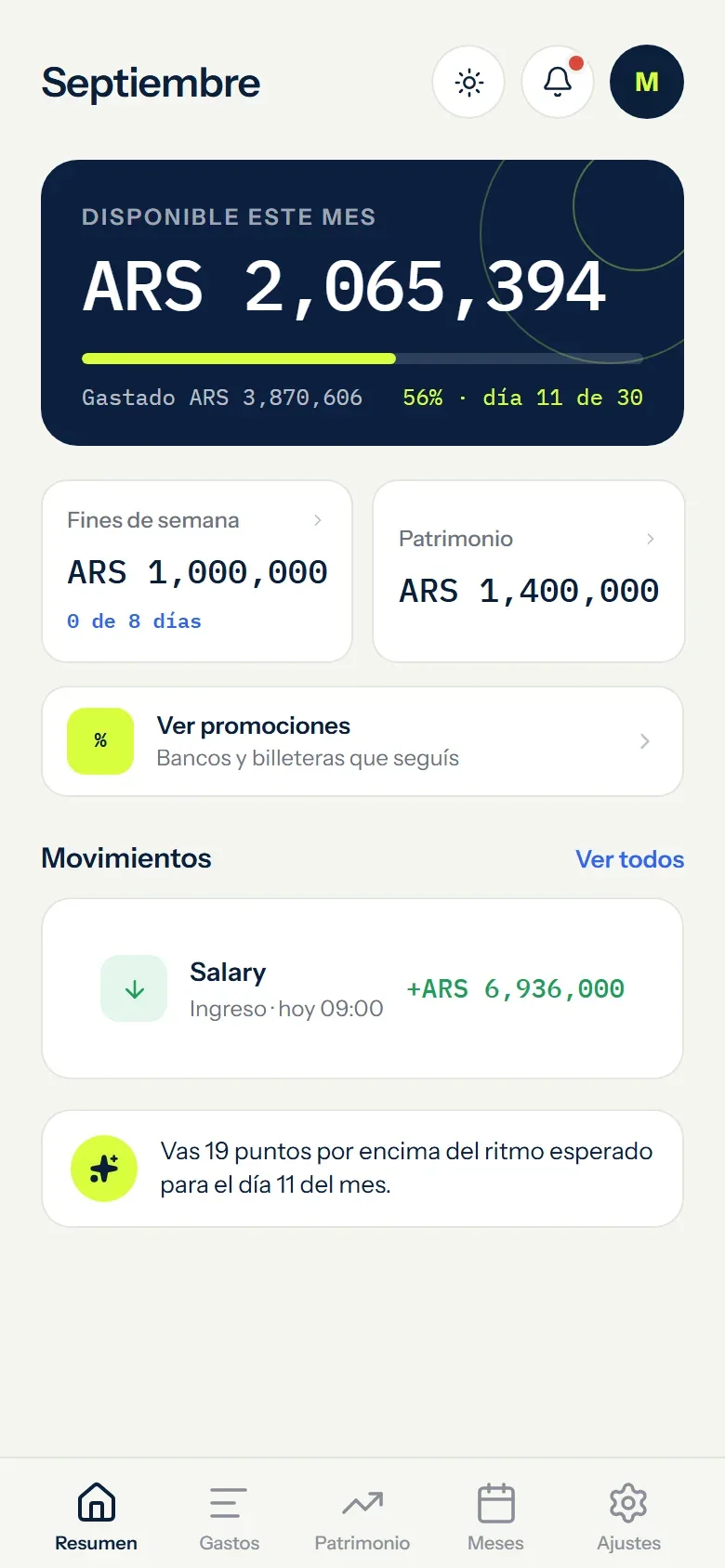
Every part of your month.
One place to plan it.
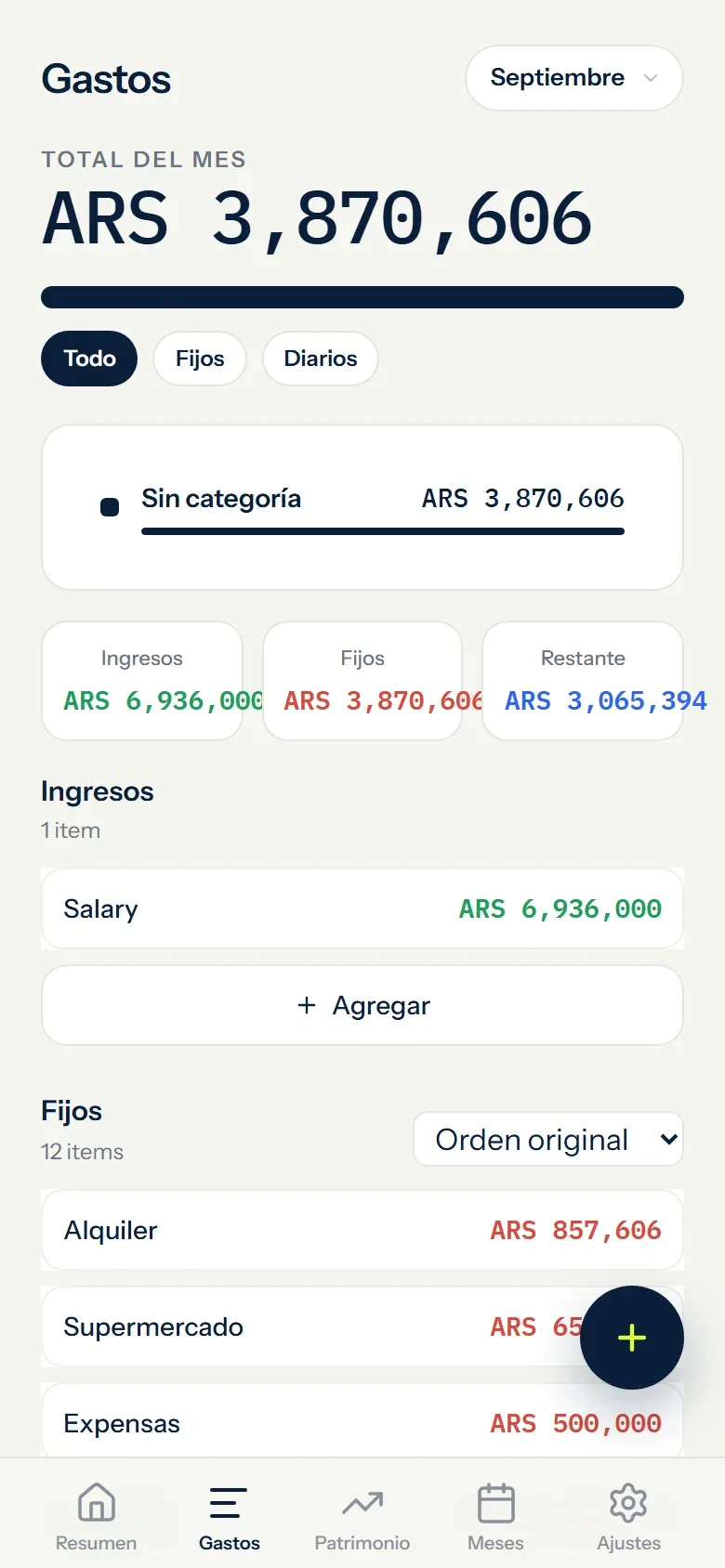
From rent to your next weekend away. Organize what comes in, what you need to pay and what you want to set aside.
01Income and budgetSee what is left in your budget
Add your income and see what remains after planned expenses and reserves. The calculation follows your entries; it is not your bank balance.
- Updates with every movement
- Works with variable income
- Keeps a month-by-month history
02Bills and instalmentsSee every commitment before spending
Bills, subscriptions, instalments, categories and recurring expenses stay organised in the right month.
- Instalments progress month by month
- Recurring expenses and categories
- Configurable due-date reminders
03Weekend reserveSet fun money aside from the start
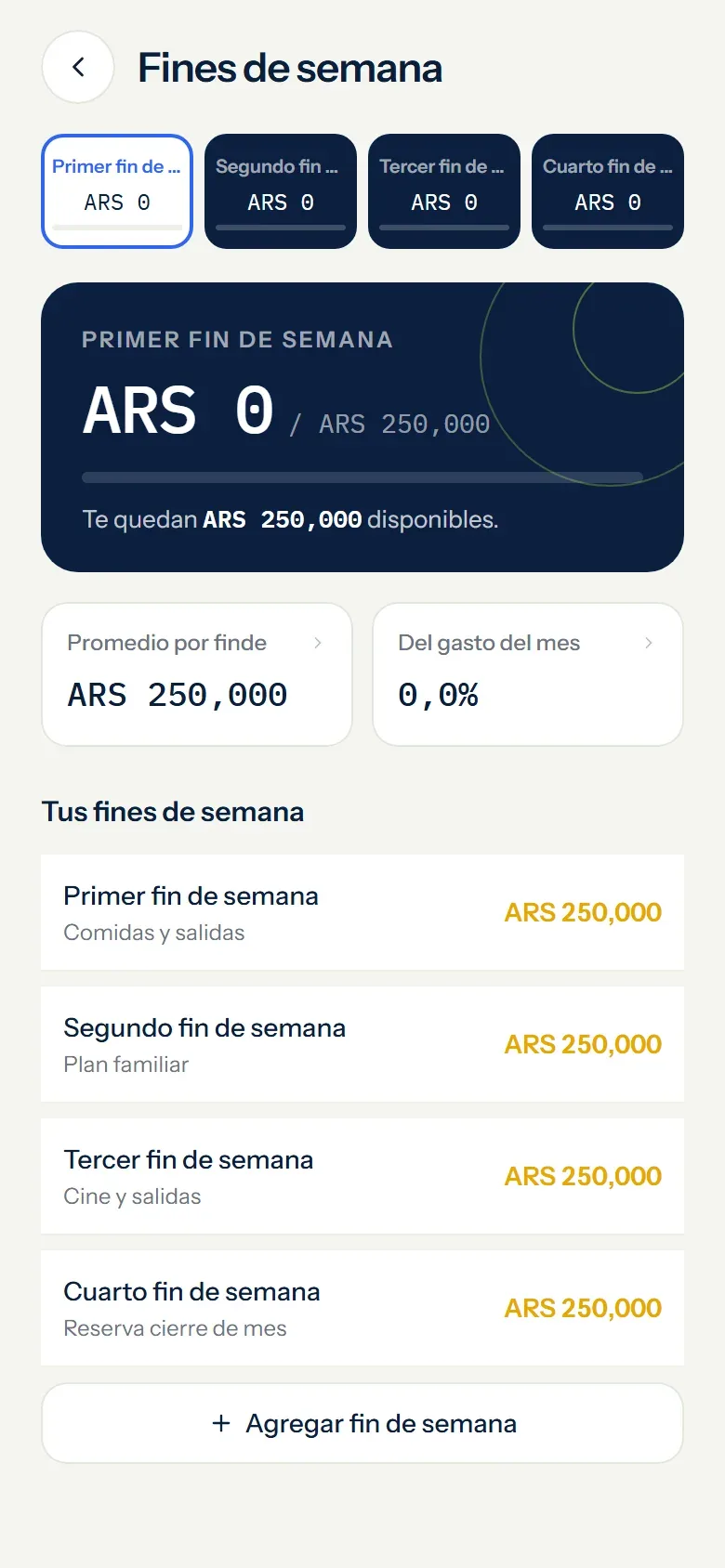
Choose an amount for each weekend and Monthly holds it inside your monthly plan.
- Separate from daily spending
- Adjustable every month
- Track each weekend
04Investments and debtYour assets and debts, together
Track investments, assets and debt without connecting a bank or brokerage account.
- Assets and debt together
- Collection and due-date reminders
- No banking credentials
THERE IS ROOM FOR MORE.
Bank offers in Argentina
Find promotions from supported banks and wallets in Argentina. Check the provider's terms and dates before paying.
See how it worksAI assistant
With your permission, the assistant uses relevant financial context to explain the month and suggest next steps. Its output is guidance and must be checked.
See how it worksMonthly on WhatsApp
Write an expense and Monthly asks whether it belongs to daily spending, the weekend reserve or a fixed expense. Review close matches or open the full list before confirming.
See how it worksAccount, install and export
Use Google or email and password, install Monthly like an app and export your information whenever you need it.
See how it worksMONTHLY GOES WITH YOU
APP + WHATSAPP ↗Your month.
A message
away.
Check your budget or add an expense from the chat you already use. Keep your plan close, even when you are on the go.
FROM MESSAGE TO MONTH
FOUR EXPLICIT STEPSSay it naturally
Write the amount and concept just as you would in a chat.
Choose the source
Daily spending, weekend reserve or a matching fixed expense — with the full list one tap away.
Review the action
In the guided flow, check the amount, concept, date and exact destination before it changes your month.
Get a clear receipt
Monthly confirms what was saved and shows the remaining or exceeded balance.
Connected only when you choose.
Link your number with a one-time code from Monthly.
It does not guess where money comes from.
Monthly suggests close matches and always lets you open the full list of fixed expenses.
Your messages stay out of external AI.
Monthly processes the channel’s text and receipts without sending them to an AI provider.
This optional channel has usage limits. You can keep using the app when those limits are reached.
LIFE IS NOT A SPREADSHEET
Different months.
Your way to plan.
THE SMALL PRINT, MADE CLEAR
Everything clear.
Before you start.
How it works, what is included and what happens with your data. Here are the answers.
Explore all questions01Is Monthly free? Do I need a credit card?
Yes. Monthly is free and does not require a credit card. You can plan your budget, track expenses and export your records without a paid plan. The optional WhatsApp channel has usage limits so it can remain free.
02Do I need to connect a bank account?
No. You enter the income and expenses you want to organize. Monthly never asks for bank credentials, reads your transactions or moves money. The available amount is based on your budget entries, not your live bank balance.
03Can I budget with irregular income?
Yes. Add multiple income entries and adjust your bills and reserves each month. Your budget can follow freelance work, commissions or changing paychecks instead of assuming you earn the same amount every month.
04Can I use Monthly on a phone and a computer?
Yes. Monthly works in phone, tablet and desktop browsers without an installation. You can also add it to the home screen on supported devices. Sign in with the same account to access your synced records.
05How do I keep my budget when I change devices?
Sign in with the same Google or email account to access records saved to that account. Before switching devices, check that your changes have synced. You can also download a backup from Settings for an extra copy.
06Can I export my budget to Excel?
Yes. Export your financial records as CSV or Excel and download a full backup from Settings. You keep a copy of your information and can continue working with it in a spreadsheet.
07How does Monthly protect financial data?
Monthly uses HTTPS and keeps your records associated with your account. It does not sell financial data or use it for advertising. The Privacy Policy explains the providers involved and how data is handled when you choose to use AI or WhatsApp.
08Is the AI assistant professional financial advice?
No. With your permission, the assistant can use your budget context to help you understand your month. Its responses may contain mistakes and do not replace professional advice. The Privacy Policy explains what information the AI provider receives.
09Can I track expenses through WhatsApp?
Yes. Link your number from the app to check your month or write an expense. Monthly asks whether it belongs to daily spending, the weekend reserve or a fixed expense, suggests close matches and lets you open the full list. In the guided flow, you review the amount, concept, date and destination before saving. Receipts always require confirmation; only high-confidence text rules you enable in Smart mode can apply automatically. WhatsApp is optional and a global guard pauses it before costs can be created.
10Which languages does the WhatsApp assistant understand?
It supports Argentine, broader Latin American and Mexican Spanish, plus US and UK English. If your language is unclear, it asks you to choose. You can change that choice from the language menu.
11Why does WhatsApp sometimes pause a reply?
The optional channel has a shared global limit to keep it free and can only reply within the service window opened by your messages. If the global capacity or a privacy check prevents an action, Monthly pauses the channel before a cost can be created. You can continue managing your budget in the app.
12What happens when I send a receipt image?
Receipt reading requires your permission and supports JPEG or PNG images up to 5 MB. Monthly reads them on its own server without saving receipt files or sending them to an AI provider. You review the result before it is recorded, and can use text or a guided menu if reading fails.
Still need a hand? Get in touch
YOUR NEXT MONTH STARTS HERE
Your money deserves a plan. Start yours today.
Add your income and first expense. Give your next decision a clearer starting point.
Create my free budget- Free to use
- No credit card
- No bank connection